NokiaTheme White Black by LA - Nokia N97 and 5800 Xpress Music Theme

Posted by topijrami On January – 6th – 2011

Nokia N97 and 5800 Xpress Music Theme

NokiaTheme
Showing posts with label Phone Software. Show all posts
Bright Light Touch 1.0 - Nokia N97 and 5800 Express Music Application

Bright Light Touch 1.0 - Nokia N97 and 5800 Express Music Application
Light up your device, you can use it as a torch! Turn on the camera flash by sliding the on-screen switch.


Bright Light Touch 1.0 S60v5
[DOWNLOAD] - 317 KB

Best Birthday v1.0 S60v5 - Nokia N97 and 5800 Express Music Application

Best Birthday v1.0 S60v5 - Nokia N97 and 5800 Express Music Application
Best Birthday is a useful utility that helps you organizing and viewing birthdays and anniversaries in a handy way: monthly view of anniversaries found in Contacts applications, alarms in Calendar associated with them, ability to perform a fully customizable export of anniversaries from Contacts to Calendar and much more.

Features:
- Uses information from native Contacts and Calendar databases, so you don't have to enter contact information twice
- Gives the possibility to create greeting messages based on templates
- Easy to use and intuitive user interface
- Ability to sort birthdays by different criteria
- Allows making a call right from within the application
- Possibility to divide anniversaries view by month and Zodiac sign


Best Birthday v1.0 S60v5
[DOWNLOAD] - 106 KB

Nokia 5800 Xpress Music Application

eBuddy Mobile Messenger v1.02 5800 Xpress Musicebuddy version 1.3 for Nokia 5800 (AIM/MSN/YAHOO/ICQ/GTALK/FB CHAT...)!

Finally this version specifically designed for the Nokia 5800, allows you to scroll contacts, and present in full screen

To get full screen for java programs...do the following...
press menu > settings > application manager > installed apps > click ebuddy > select options > select suite settings > and turn OFF the "on screen keyboard"


Set your avatar with your cameraphone
With the eBuddy Mobile Messenger you can share all the cool things you do in an easy way. You can set your personal message and take a brand new display picture, directly from your phone s camera.


Chat on all devices, everywhere
Don't have a PC? And don't want to install anything on your mobile? Chat directly in your mobile browser with eBuddy Lite Messenger.

eBuddy Lite Messenger works on any device with an internet connection. There are also special versions for iPhone, iPod Touch and the Sony PSP.

Now, you can really chat everywhere you go!


Chat with all your friends
Do you have friends on both MSN and Yahoo? Or you have two MSN accounts? No problem! With eBuddy Lite Messenger you can have all your buddies from multiple IM accounts in one single list.

What if your friends are offline? With eBuddy Lite Messenger you can send offline messages to your friends and they will get them as soon as they come online. You can also receive offline messages.


eBuddy Mobile Messenger v1.3
[DOWNLOAD] - 270 KB

for Nokia 5800 Xpress Music, Touch screen support.

Nokia 5800 Xpress Music Application

eBuddy Mobile Messenger v1.02 5800 Xpress Musicebuddy version 1.2 build 3610 for Nokia 5800 (AIM/MSN/YAHOO/ICQ/GTALK/FB CHAT...)!

Finally this version specifically designed for the Nokia 5800, allows you to scroll contacts, and present in full screen

To get full screen for java programs...do the following...
press menu > settings > application manager > installed apps > click ebuddy > select options > select suite settings > and turn OFF the "on screen keyboard"


Set your avatar with your cameraphone
With the eBuddy Mobile Messenger you can share all the cool things you do in an easy way. You can set your personal message and take a brand new display picture, directly from your phone s camera.


Chat on all devices, everywhere
Don't have a PC? And don't want to install anything on your mobile? Chat directly in your mobile browser with eBuddy Lite Messenger.

eBuddy Lite Messenger works on any device with an internet connection. There are also special versions for iPhone, iPod Touch and the Sony PSP.

Now, you can really chat everywhere you go!


Chat with all your friends
Do you have friends on both MSN and Yahoo? Or you have two MSN accounts? No problem! With eBuddy Lite Messenger you can have all your buddies from multiple IM accounts in one single list.

What if your friends are offline? With eBuddy Lite Messenger you can send offline messages to your friends and they will get them as soon as they come online. You can also receive offline messages.


eBuddy Mobile Messenger v1.2
[DOWNLOAD] - 259 KB

for Nokia 5800 Xpress Music, Touch screen support.


MORANGE is probably the ONLY software on this planet that can make your phone as Cool as iPhone! Morange is a mobile application software that works on most Java phones. Like installing an operating system on an computer, with it suddenly you are empowered with more features on your mobile device which are beyond your imagination. For example, push email, remote desktop access, push RSS, instant messaging etc - MORANGE combines the world's finest and first-ever intergrated mobile experience in just one application.

Applications in MORANGE:
Push Mail
Email has become a necessary communication tool for your professional and personal life. While you are away from the desktop PC, MORANGE can keeps all your important emails pushed to mobile device. You will never be out of the reach, as email will follow you wherever we go.

Remote Desktop Access
There must have been cases when you need to access documents on a remote PC while you are on the go. For example, customers may want a product brochure urgently, or you may want to access your pictures to show to your friends. MORANGE enables a fast and secure access to a remote computer from mobile phone. Users can read and send documents, and you can control all different PC resources remotely. Furthermore, you don't have to have your computer always on, you can enjoy the "virtual thumb drive" to store all your files.

Push RSS
We understand access to web information on the move is very exciting and important for today’s professionals and young generations. However, very few users would accept the browsing experience on small devices. Leveraging on the power of Web RSS (Really Simple Syndication), MORANGE introduces the first-ever PUSH RSS, which allows users to be automatically informed each time their site of interest is updated, be it stock alerts, entertainment news or even web-logs.

Mobile Camera Access
When you are the move, you may want to know what is happening in your office, in your factory in another country, or what your family doing at home. MORANGE enables to you gain a peaceful mind by an interesting remote camera access from mobile. You can instantly view cameras, it is IP/WIFI cameras or Webcams, directly from your mobile devices.

PIM Synchronization
MORANGE provides robust, secure and intelligent wireless synchronization solutions capable of extending address book, calendar, tasks information in Microsoft Outlook and other data source beyond the confines of the desktop. It is cost-effective, easy-to-administer solutions and compatible with a wide range of mobile devices and platforms

Contact Book
MORANGE Contact is more than a simple address book that converges and synchronizes all the user's different address book. It is the center of all types of mobile communication – email, voice, text, phone call, web logs, file sharing, camera sharing or instant message, – accessible on a single interface on any device in any location, from a single screen in touch.

[DOWNLOAD]

Download Via Your Phone:
  1. Type wap.morange.com in your mobile phone browser.
  2. Click Download.
  3. Follow the simple setup steps on your phone.

Great way to cut down on your SMS bill

MXit is a message exchange program for your cell phone. That means you can chat to people on their PC’s and to other MXit users on their mobiles, from your mobile, anywhere in the world. Communication has never been easier.

With MXit, you can send a message of up to 2000 characters. It’s great for organizing a night out, or simply saying hello. And not only can you chat to other MXit users, but you can also connect to MSN messenger, Yahoo, ICQ, AOL messenger or Jabber communities.

MXit can be used anywhere in the world, as long as there is GPRS/3G coverage. So you can chat to friends overseas and tell them just how much you miss them for the same cost. Never thought you could do all that with your mobile, did you?

How to Download:
1. Go to www.mxit.co.za/wap On your mobile browser, go to 'services' (globe icon).
2. You should be welcomed to the MXit WAP portal at this stage.
3. Check that your mobile manufacturer and model has been detected correctly.
4. Open, accept and download!
7. Start chatting


Multi network chat
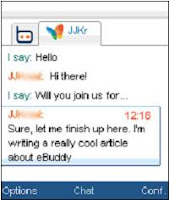
With the eBuddy Mobile Messenger you can chat with your friends on MSN, Yahoo, AIM and Google Talk.

Filter through your contacts easily with the new QuickSearch feature. Then chat longer because we have improved connection handling and minimized data usage.

Customize your settings
The eBuddy Mobile Messenger features an easy settings screen where you can tailor the application to your liking.

Adjust the volume of the alerts. Or the way your contacts are ordered. With just a few clicks you have it just the way you like it.

Size : 120 kb

[DOWNLOAD]

Free J2ME Yahoo Messenger

YMTiny is a free J2ME Yahoo Messenger. Directly connects to the Yahoo's server. Just connect with your Yahoo! ID, no other registration needed. It should works on all CLDC 1.0 and MIDP 2.0 devices. Full tested with SE K510i.

Features
- Settable message alerts: sound (midi), vibrate, flash backlight, open IM window
- Bitmap fonts for consistent interface
- "Smart Ping" maintains connection and minimizes bandwidth usage
- Receives offline messages, new mail and typing notifications
- Set status and custom status
- View a friend's status, show and hide offline friends
- Send and receive BUZZ!!!
- Run in background and auto-restore
- Window and scroll animations
- Stylus support
- 54+2 Emoticons!
- Data counter

Limitations
- Does not support HTTP/WAP connection yet
- Minimize function only works on some devices
- Stylus support is not tested yet
- Bitmap fonts could be invisible on some devices. Requires devices that support transparancy drawing.
- Emoticons only works on bitmap fonts
- Data counter may be inaccurated

Next features

- Sends typing notifications (settable)
- More sounds
- Message archive
- Conference
- Skins


size : 165 Kb

[DOWNLOAD]

Opera Mini 4 - Fast, safe and secure

Opera Mini™ is a fast and tiny Web browser that allows you to access the full Internet on your phone. Take all your favorite Web sites and download images, MP3`s on the go with Opera Mini!

Opera Mini 4 delivers several new features for quicker scrolling, navigation and page rendering. This newest release also includes optimized features for BlackBerry devices, Landscape Mode (so — if you prefer to — you can now view your content sideways) and the ability to sync your Bookmarks and Speed Dial with those on your Computer. Opera Mini 4 now enables you to take your full Web experience and digital lifestyle with you — everywhere you go. Opera Mini 4 is free, so download it now!

Opera Mini uses a remote server to pre-process Web pages before sending them to your phone. Web content is optimized for your device, ensuring fast browsing and a great user experience.

Opera Mini™ offers the same speed and usability as the renowned Opera mobile browser, and uses Opera’s Small Screen Rendering™ technology to provide access to the Web. It has all the features expected of a browser, and more, such as content download, skinning, bookmarks, browsing history. In addition, Opera Mini recognizes your phone and optimizes Web pages accordingly to provide faster browsing.

This download file contains both MIDP1 basic and MIDP2 advanced versions. If you are unsure which one to install please visit the following link with your phone`s WAP browser, and you will receive the right version.

Download from your PC:
[Download]

Download from your Phone:
Point your phone's WAP browser to http://mini.opera.com/ and click on Download Opera Mini.

Updated April 12, 2008
What is vBag?
vBag is a GameBoy Advance emulator that can play GBA games on your mobile phone. vBagX is the latest version of vBag.

- vBagX 1.12
compatible with : 6600, 7610, N-Gage, N-GageQD, 6630, 6680, 6681, 3230, 6620, 6670, N70,
etc

[DOWNLOAD](304 kb)

If keygen not working, download the previous version and install it, then install the newer verson.

[DOWNLOAD] vBagX 1.0 (154 kb)

Make sure your ROM file ends with ".gba", and send them to mobiles via bluetooth or USB or card-reader. If you install vBagX on your MMC card, please put the roms into the folder "MMC:\data\Others\vBag";If you install vBagX on your phone memory, please put the roms into the folder "C:\Others\vBag". We recommend you install vBagX on MMC.


- vBagX s60v3 1.25
compatible with : 3250, 5500, 5700, N71, N73, N80, N91, N92, N93, N95, E50, E60, E61, E70,
etc

[DOWNLOAD]
vBagx 1.25 (171 kb)

Then register using this keygen:

[DOWNLOAD] Keygen
(155 kb)


SmartMovie is a video player for your mobile device, with counterpart PC converter utility. With the converter, you may prepare any video clip for playback on your mobile device.

Here are some key features of "SmartMovie for Symbian":

· Standard AVI format, allowing you to preview converted files on your PC.
· Uses downloadable video codecs, allowing you to compress and play back videos in our favorite format.
· Player uses the phone screen in portrait or landscape mode,
· utilizing the full screen size of the device.
· PC converter allows you to split video file into multiple segments, so that it fits onto your memory card, if not entire,
· then cut to more parts - you may watch your favorite video in parts, e.g. while traveling to work/school.
· First mobile player which supports subtitles - allowing you to watch movies in different languages.
· Friendly PC converter - preview videoxvid,movie,free,mp3,divx

Requirements:
Symbian devices.

v3.25
size: 518,49 kb

[Download]

Download Smartmovie Converter here


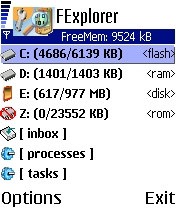
Fexplorer is a free file browser. It allows you to manipulate any files, you can use the cut/copy/paste functions through the directories, you can also send files via bluetooth or infrared. Other usefull functions are also available such as making or removing directories, keeping the light always on etc.


Requirements:
S60 device

v1.17
size:
119.00 KB


[Download]


Reminder With Azan 5 times a day
Only adjust it t your city & calculation method
and leave the rest to the program.
Use it at home or even take it on holiday. Mobile Molvee works anywhere in the world.

Compatible with:
All J2ME models :: All Any J2ME device
size:
63,11 kb

*for indonesian people please click here"


[Download]


Complete Holy Quran For Your Mobile.
In this release, you can find a new interesting option: you can search any word in a sura or in any part of the quran...

work with s60


v.0.96b
size : 254 Kb


[Download]


This program allows you to save MESSAGES directly on your MMC instead of your PHONES MEMMORY!!
Here I mean ALL messages From SMS , MMS to BLUETOOTH!!

Note: After installing this patch YOUR NOT able to see the SMS messages you have in your PHONES MEMORY!! I suggest you BACKUP THE IMPORTANT MESSAGES in your phone before installing this patch!!! (the old messages will be still left in the PHONES MEMORY waiting for you to UNDO the patch!!)

ACTIVATE MSVDRIVEE:
- Just install the MsvDriveE.sis file
- Open the patch ONCE!!!
- Now if you go to your SMS messages you will see a MEMMORY CARD IN THE UPPER LEFT CORNER!! (next to your signal)
- done.

TO UNDO THIS PATCH:
Switch off phone ---> Take the MMC out
(Now the messages will be read from YOUR PHONE MEMORY AGAIN)
(Run the PATCH ONCE again to ACTIVATE it again)

So if you send files now, the files wil be send to E:\ (your MMC) instead of C:\ (your phones memory)

size : 1.2 Kb

[Download]

With SMS Timer you can schedule your SMS messages for sending at some later time.

Works with Nokia Phones.


v1.1
size : 14 Kb


[DOWNLOAD]


Updated February 06, 2008
LCG Jukebox is music player for mobile devices, that is designed to suit all your music listening desires. It has excellent sound quality, comfortable playlist management, easy music selection, equalizer, Internet streaming, and more. Additionally it can find album image and song lyrics on the Internet, to enhance your listening experience. Simply everything to perfectly enjoy your music collection!

Main features:
  • High quality stereo playback (if device supports stereo)
  • Mp3 and Ogg music formats
  • Internet radio streaming
  • Fine volume control - 100 levels from silence to loudness
  • Sleep timer letting you to fall asleep with your music
  • 10-band equalizer with several presets
  • Playlist editor - add, remove, save, load, order your songs
  • Customizable colors
  • Album image search on Internet
  • Lyrics search and display
  • Playback in normal or random order
  • Mini mode displayed on phone idle screen
size :
576,03 kb

v2.17
[download]

~request your favorite lyrics here~

How to install lyrics to Jukebox: rename the *.lrc file to the same name with the mp3 song. Like this : eminem-stan.mp3 + eminem-stan.lrc , then put them into the same folder.

How to install album image to Jukebox: rename the *.jpg or other image format file with this format : song name-song album.jpg , then put them into the same folder.

    eXTReMe Tracker